
How to restore old damaged photos
.jpg)
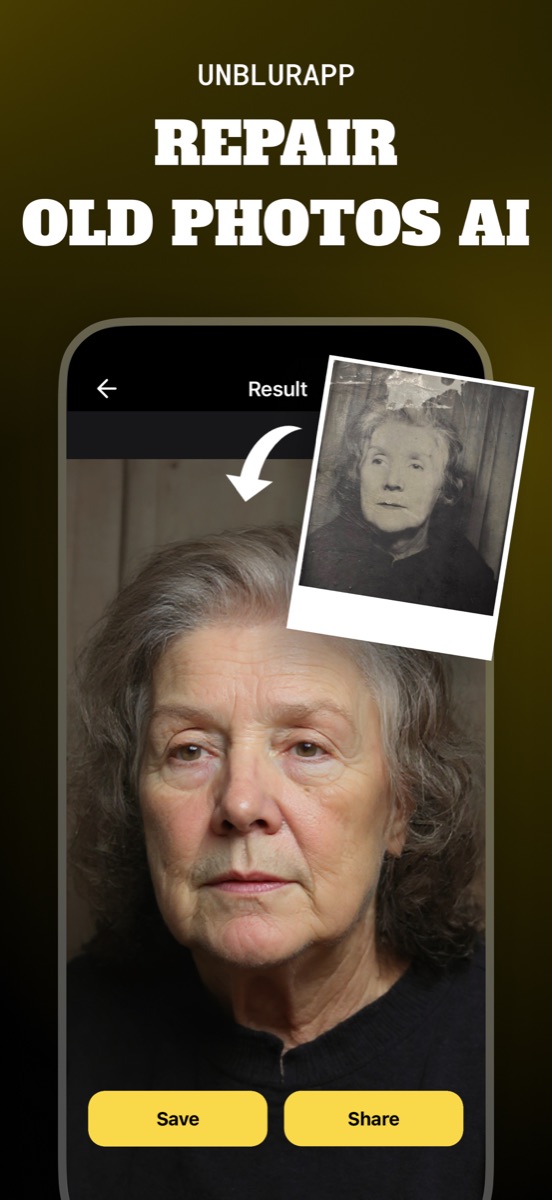
Damaged prints can be rebuilt digitally without touching the original. Photograph the print flat in soft daylight, open it in UnblurApp and run Repair, which fills cracks, removes scratches and reconstructs torn areas at up to 4x resolution.
Handle the print before you photograph it
A brittle print can lose more in thirty seconds of careless handling than in the previous thirty years. Hold it by the edges. If it is stuck to glass or to an album page, stop and leave it: pulling a print off an adhesive backing removes the emulsion, and the picture goes with it. A conservator can separate it; a kitchen table cannot.
Dust it with a soft brush, never a cloth, and never with water or cleaning fluid. Curled prints can be flattened for a few minutes under a heavy book with clean paper on both sides, but do not force a crease flat.
Capture it so the damage is visible, not doubled
- Lay the print flat, no glass
Reflections on glass become part of the file and the model will treat them as damage patterns.
- Use soft indirect light
Angled light throws a shadow into every crease, which makes the damage read as deeper than it is.
- Shoot straight on and fill the frame
Keep the phone parallel to the print so edges stay square.
- Run Repair
Open the capture in UnblurApp, choose Repair, and save the result as a new file.
Flat, even light matters more here than on an undamaged print. A crack lit from the side casts a shadow, and the restorer then has to rebuild both the crack and the shadow it made.
What Repair handles well
Fine scratches and surface scuffs disappear almost completely, since the surrounding detail tells the model exactly what belonged there. Creases and fold lines across a background are similarly straightforward. Tape residue and yellowed adhesive marks come out cleanly. Small torn corners get reconstructed from the pattern around them.
Water damage is the mixed case. Where a stain has darkened the paper but left the image underneath, the tool recovers it. Where the emulsion has lifted entirely, there is no image to recover and the model fills the area with something invented.
Damage across a face is the hard case
A crack running through a background is easy: the model continues a wall or a curtain. A crack running through someone's eye is a reconstruction, and the person it produces may be subtly not your grandfather. Run Restore Faces after Repair and look closely at the result before you share it with the family.
When the damage covers a large part of a face, the honest answer is that a human retoucher working from other photos of the same person will beat any automated tool. The app gets you a usable version in a minute, which is often enough.
Know when to call a professional
Three situations justify the cost. Prints that are stuck to glass or to each other, where separation is a physical problem and not a digital one. Photographs with genuine historical or monetary value, where a conservator should see the object. And the single most important photo in a family, where you want a human making the judgment calls about a damaged face.
For the other ninety per cent, a phone capture and a minute of processing gets you a photo people can actually look at again.
Questions people also ask
How do I restore a damaged photo without it looking fake?
Stop at the point where the damage is gone but the grain and tone of the original remain. Restorations start to look artificial when the texture that dated the photograph has been polished away along with the cracks.
Can a photo torn in half be restored?
Yes, if you have both halves. Lay them together as closely as you can, photograph them as one image, and Repair will rebuild the seam. A missing piece has to be invented, not recovered.
Will restoring damage change the original print?
No. Everything happens on a digital copy. The physical print stays exactly as it was, which is the reason to work this way instead of with chemicals or tape.
Related guides
How to restore old photos
Restore old photos without a scanner or Photoshop. How to capture prints properly, what AI restoration fixes, and how to make old photos look new.
Read the guide →
How to colorize black and white photos
Colorize an old photo in one tap. How AI picks skin tones and fabric colours, what it gets wrong, and why you should always keep the black and white original.
Read the guide →
How to unblur a face in a photo
Face unblur that keeps the person recognisable. Why portraits need a dedicated model, how AI face restoration works, and the limits worth knowing.
Read the guide →