Free on the App Store · iPhone & iPad

Unblur any photo and restore old pictures on your iPhone

Photo Enhancer: Unblur Photo removes blur from photos, repairs damaged prints and brings colour back to black-and-white photographs. Pick a picture, tap once, and compare the result before you save it. Most photos finish in under a minute.

Download on the App StoreNo editing skills needed
  • Remove blur and camera shake
  • Restore old and damaged photos
  • Colorize black-and-white prints
  • Upscale to HD at up to 4x
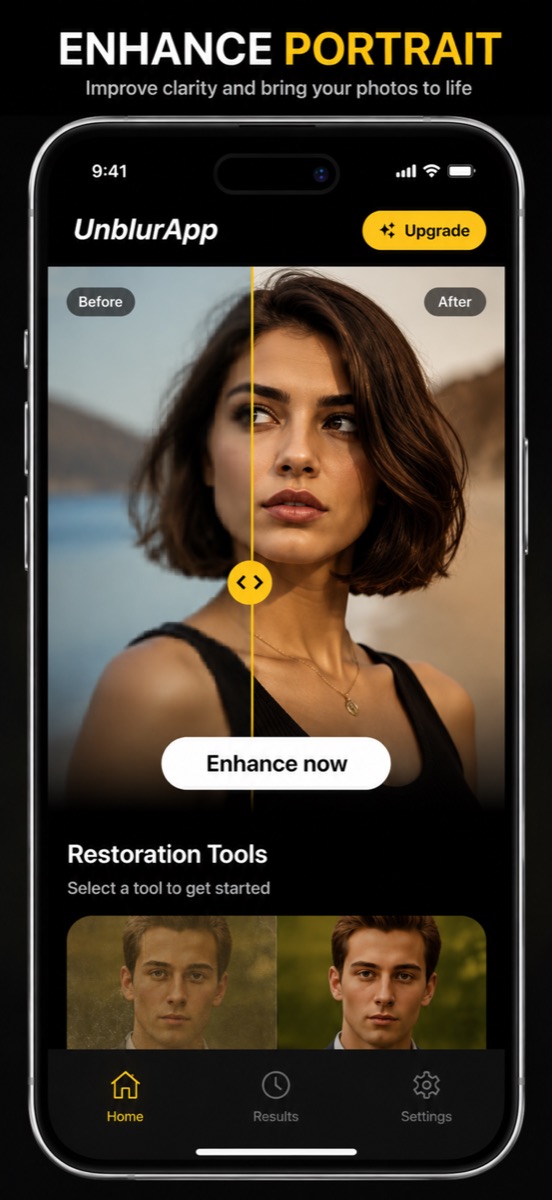
UnblurApp home screen with a before and after slider dragged across a blurry portrait, showing the sharp AI-enhanced half on the right

What it fixes

Blurry photos

Motion blur, missed focus and low-light shots you cannot retake.

Old prints

Faded, cracked and torn photographs from the family album.

Pixelated images

Files flattened by chat apps or saved too small years ago.

Black & white

Monochrome and sepia photographs given natural colour.

Remove blur from photo files in one tap

Camera shake, a missed focus point, a moving toddler. The AI reads what the picture was meant to be and rebuilds the edges it lost, so clearing blurry pictures takes a tap instead of an hour in an editor.

  • Motion blur and soft focus on people, pets and objects
  • Low-light phone shots with smeared detail
  • Screenshots and images saved from messaging apps at low quality
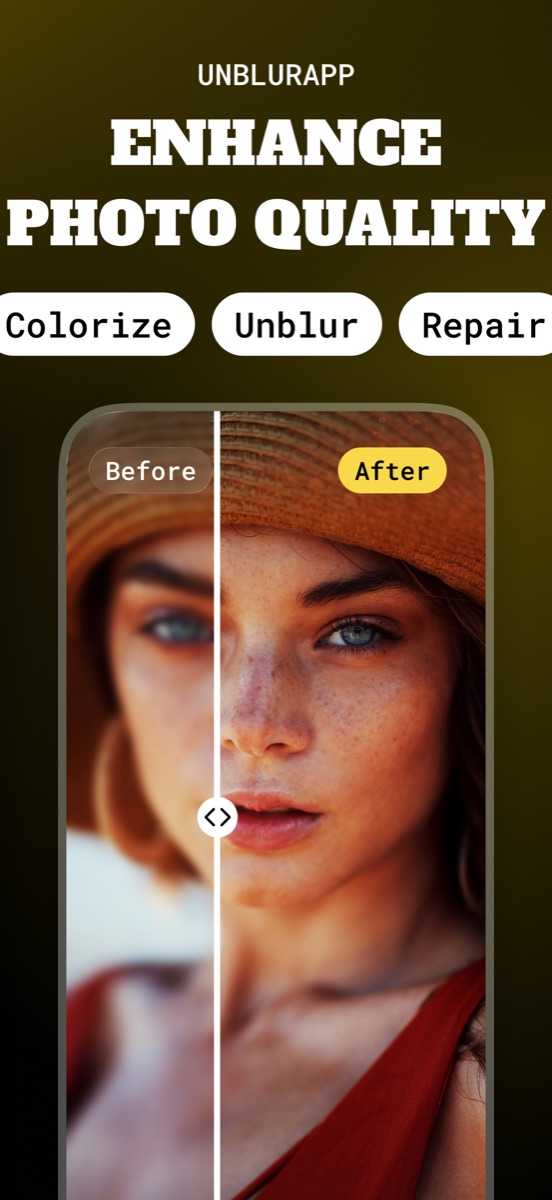
Before and after comparison of an out-of-focus portrait, with freckles and eye detail recovered on the unblurred side
The unblur pass rebuilds edge detail: freckles, eyelashes and the weave of a straw hat come back.

Restore old photos and repair the damage

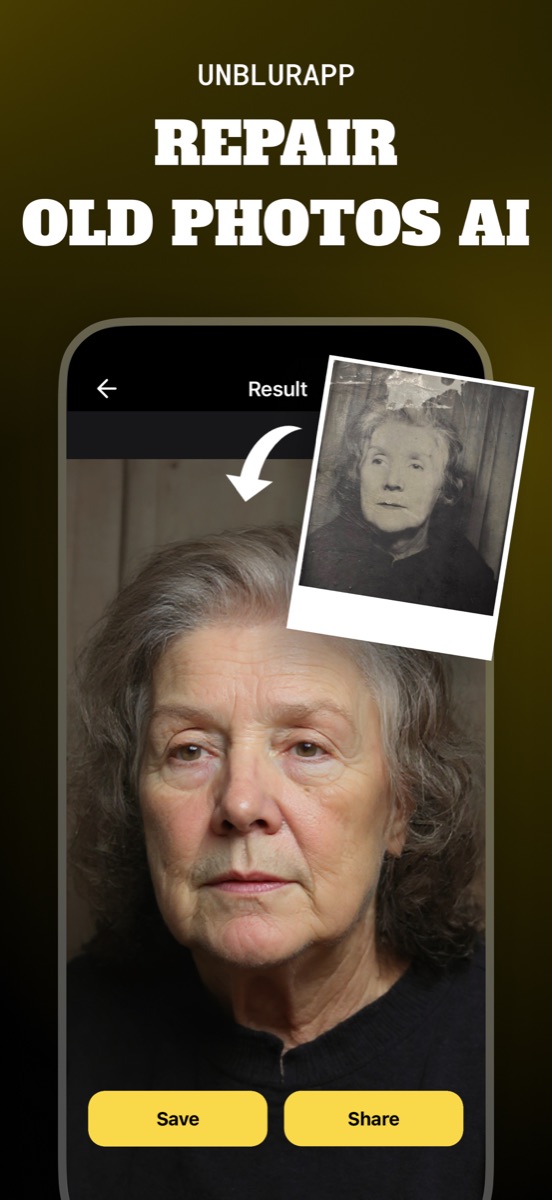
Scans of prints from the 1950s arrive with cracks, tape marks and a corner someone tore off. Repair fills those gaps and reprints the photo at up to 4x the resolution you fed it.

  • Photo scratch removal, creases and water stains
  • Faded prints brought back to full contrast
  • Old damaged photo scans exported large enough to frame
A torn, water-damaged black and white portrait of an elderly woman repaired into a clean high-resolution photo, with Save and Share buttons
A cracked studio print with a missing corner, repaired and ready to save at full resolution.

Colorize black-and-white photographs

Colorize reads skin, fabric, foliage and sky separately, then applies colour that matches the era instead of tinting the whole frame one shade. Grandparents in a 1962 wedding photo end up looking like people, not a filter.

  • Black-and-white and sepia prints
  • Natural skin tones on group portraits
  • The original file stays untouched in your library
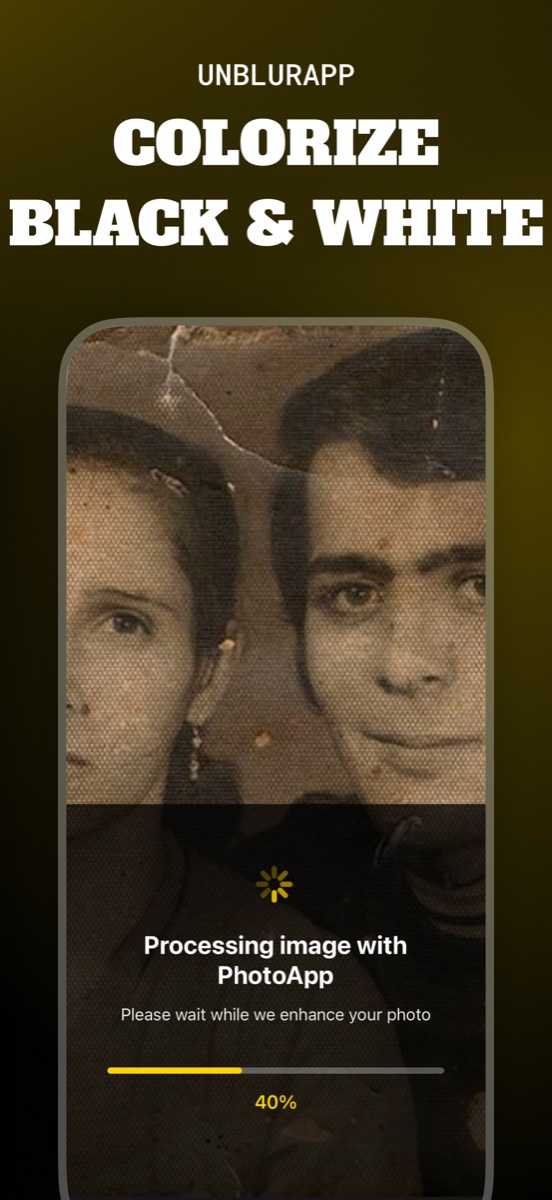
Colorize tool processing a scratched sepia photograph of a young couple, with a progress bar at 40 percent
Colorizing a sepia print. Most photos finish in well under a minute.

AI face restoration for portraits

Faces get their own model. Restore Faces works on the eyes, mouth and hair boundary, which is where a general sharpening filter usually produces a waxy mask.

  • Unblur face detail in group shots and old class photos
  • Recover expression in soft or grainy portraits
  • Works on several faces in the same picture
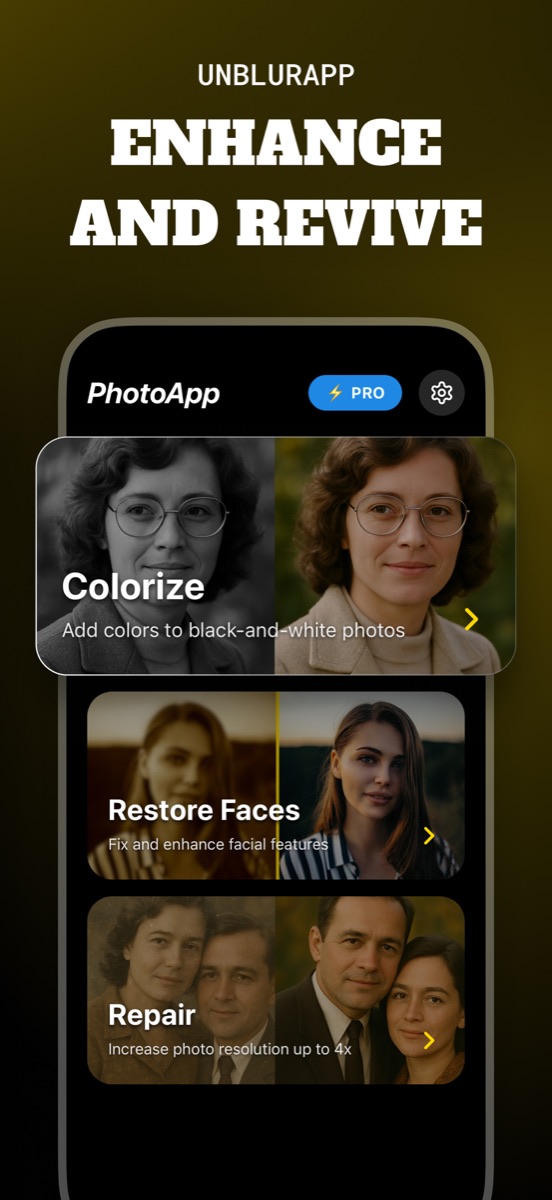
UnblurApp tool list showing Colorize, Restore Faces and Repair cards, each with a before and after thumbnail
Three tools beyond the one-tap enhance: Colorize, Restore Faces, and Repair at up to 4x resolution.

Unpixelate and upscale to HD

A 480-pixel image saved off a website years ago has no detail left to sharpen. The upscaler generates it: image restoration up to 4x, sized for print instead of a thumbnail.

  • Unpixelate image files compressed by chat apps
  • Old web downloads and profile pictures
  • Export at full resolution and share straight from the app
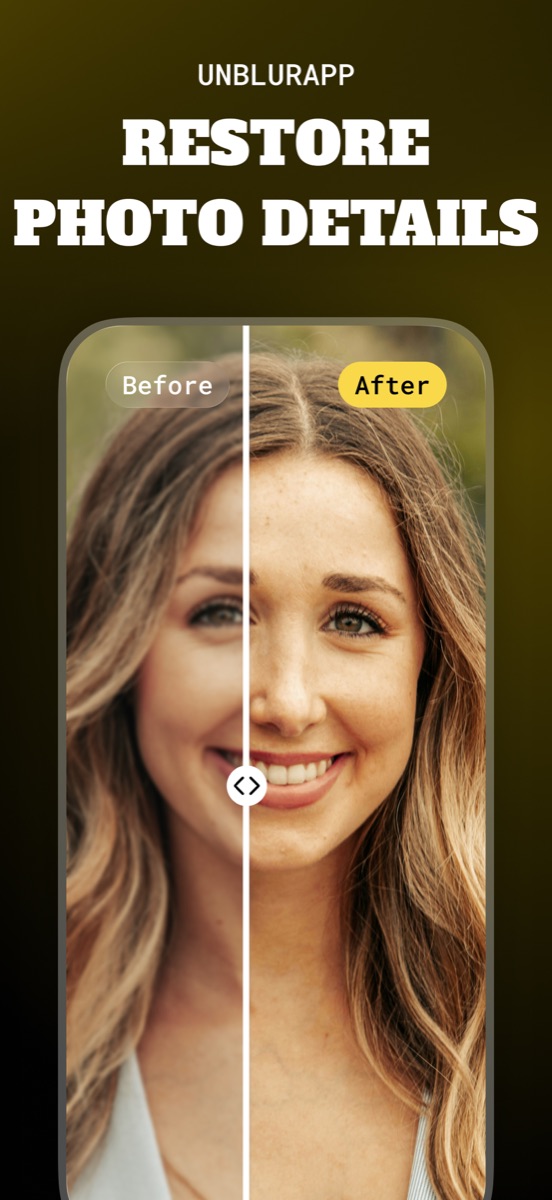
Split comparison of a soft outdoor portrait next to the restored version with sharp hair strands and defined eyes
Restore photo details on shots that were slightly out of focus when you took them.

How it works

  1. Pick a photo

    Choose any image from your camera roll, including scans of old prints.

  2. Choose a tool

    One-tap enhance, or Colorize, Restore Faces and Repair for specific jobs.

  3. Compare

    Drag the before and after slider to see exactly what changed.

  4. Save and share

    Export at full resolution. Your original file is never overwritten.

Guides

Practical walkthroughs for the photo problems people actually have, written to be useful whether or not you install anything.

A hand holding a phone at a golden-hour viewpoint, the screen showing a crisp portrait against the softly blurred scene behind it

How to unblur a photo on your iPhone

Unblur a photo in three taps. What causes blur, which blurry pictures can actually be saved, and how to remove blur from a photo on iPhone.

Read the guide →
Vintage family photographs and a magnifier spread across a wooden table in warm window light

How to restore old photos

Restore old photos without a scanner or Photoshop. How to capture prints properly, what AI restoration fixes, and how to make old photos look new.

Read the guide →
A smartphone on a dark desk beside a lens and a small stack of printed photographs, lit by a single warm lamp

Choosing the best app to unblur photos

Choosing an app to unblur pictures? Here are the five things that separate a useful photo unblur app from a watermark factory, and how UnblurApp compares.

Read the guide →
A mosaic of small amber and grey tiles resolving into a smooth curved surface across a dark background

How to unpixelate an image

Pixelated image fix that actually works: why sharpening makes it worse, how AI upscaling rebuilds detail at 4x, and the limits worth knowing about.

Read the guide →
A desk with a notebook, a receipt and a phone photographing a page, lit by warm angled light with deep shadows

How to deblur text in an image

Deblur text in a photo of a whiteboard, receipt, sign or document. What works, what the letter-shape test tells you, and how to capture better next time.

Read the guide →
A monochrome photographic print on a table with warm colour washing across one half of it under soft window light

How to colorize black and white photos

Colorize an old photo in one tap. How AI picks skin tones and fabric colours, what it gets wrong, and why you should always keep the black and white original.

Read the guide →
A cracked and torn vintage print resting on a conservation table beside cotton gloves and a soft brush

How to restore old damaged photos

Repair damaged photos with cracks, scratches, tape marks and torn corners. How to handle a fragile print, capture it safely, and rebuild it with AI.

Read the guide →
A close portrait lit from one side, half of the face in soft shadow and half in sharp warm light against a dark background

How to unblur a face in a photo

Face unblur that keeps the person recognisable. Why portraits need a dedicated model, how AI face restoration works, and the limits worth knowing.

Read the guide →

Frequently asked questions

How do I unblur a photo on my iPhone?

Open UnblurApp, pick the blurry picture from your camera roll and tap Enhance now. The AI rebuilds the lost edge detail and hands back a sharp copy, usually in under a minute. Your original stays where it was.

Learn more →
Is there a free app to unblur pictures?

UnblurApp is free to download and free to try. A subscription unlocks unlimited enhancements and full-resolution export, and you can cancel it from your App Store account settings at any time.

Learn more →
Can AI really restore old photos?

Yes, within limits. The model has seen millions of faces and prints, so it can rebuild a cracked edge or a faded cheek convincingly. It reconstructs plausible detail rather than recovering the exact original, which matters if the photo is evidence rather than a memory.

Learn more →
How do you fix a pixelated image?

Sharpening a pixelated file makes it worse, because the detail is gone rather than soft. Run it through the upscaler instead: it generates new pixels at up to 4x and reconstructs the shapes the blocks were standing in for.

Learn more →
Can you deblur text in an image?

Often, yes. Text on a whiteboard, a receipt or a street sign responds well as long as the letter shapes are still faintly there. If the words have dissolved into grey, no tool can invent the right ones.

Learn more →
How do I add colour to a black-and-white photo?

Choose Colorize and select the print. The model identifies skin, clothing, plants and sky separately and colours each one, so a 1950s portrait comes out looking photographed rather than tinted.

Learn more →
Can old damaged photos with scratches be repaired?

Repair handles scratches, creases, tape marks, water stains and missing corners. Scan or photograph the print flat in even light first, because the tool can only work with the detail your capture actually contains.

Learn more →
Are my photos private?

Photos are sent for processing, returned to your device, and not published, sold or used to advertise to you. If a picture is sensitive enough that this matters, keep it out of any cloud enhancer, including this one.

Give an old photo a second look

Free to download, works on iOS 15.1 and later, and the first result takes about a minute.

Download on the App Store